Data collection your BCBAs will actually defend.

Every data type, collected offline on mobile and graphed with the rigor a treatment-plan review demands.

Graphs that hold up in a payer review

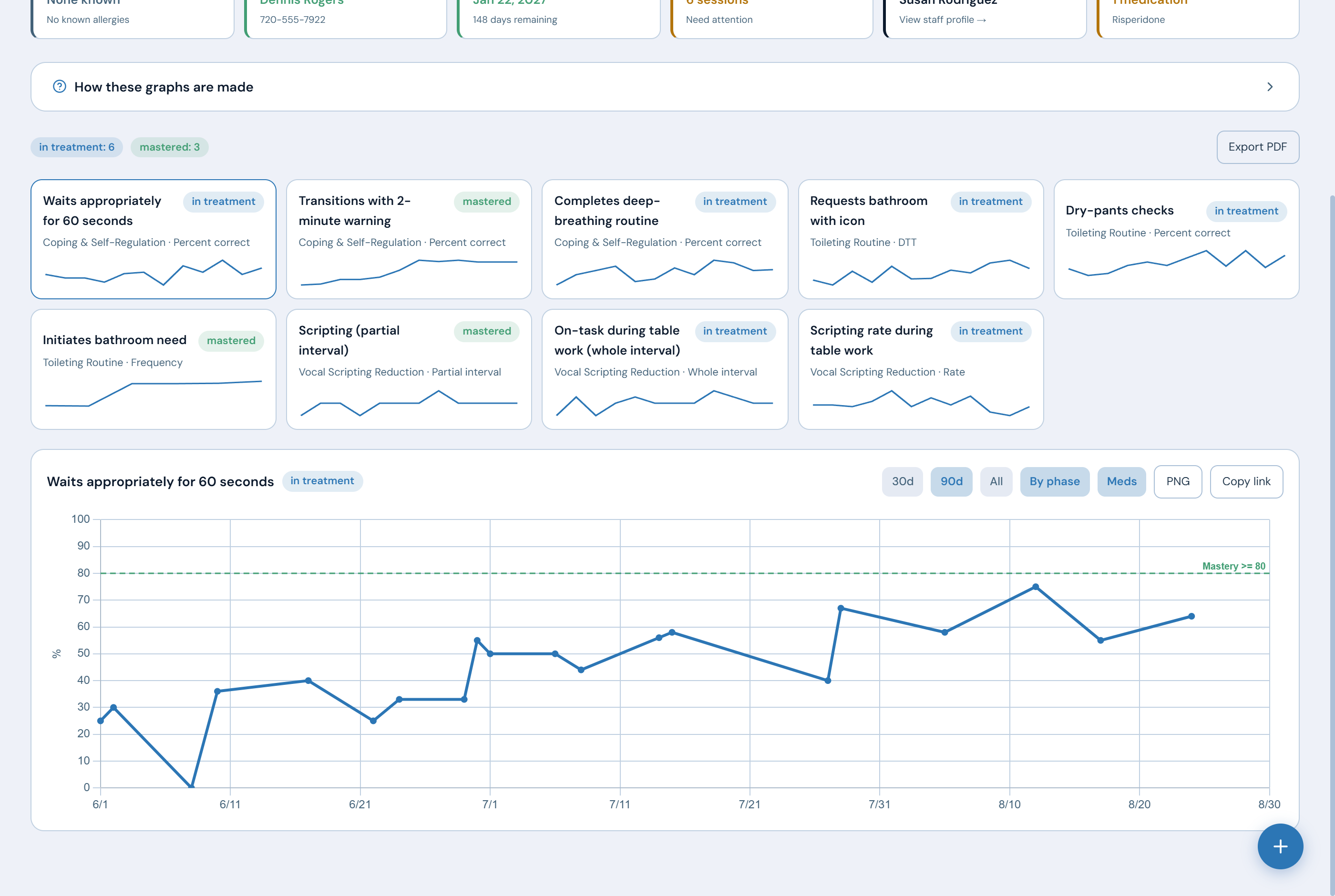
Phase-change lines, mastery-threshold overlays, trend lines, and prompt-level stacking for DTT. All of it renders from real session data, and any graph exports to PNG or PDF for treatment-plan reviews.

  • Vertical phase lines with annotations ("Phase 2: added time delay")
  • Mastery criteria drawn on the graph, not in a footnote
  • Date-range and by-phase views
ABAVault™ · Clinical graphs
A target graph with the mastery threshold drawn across it, shown under every other target on the client with its status.

Actual product screenshot A target graph with the mastery threshold drawn across it.

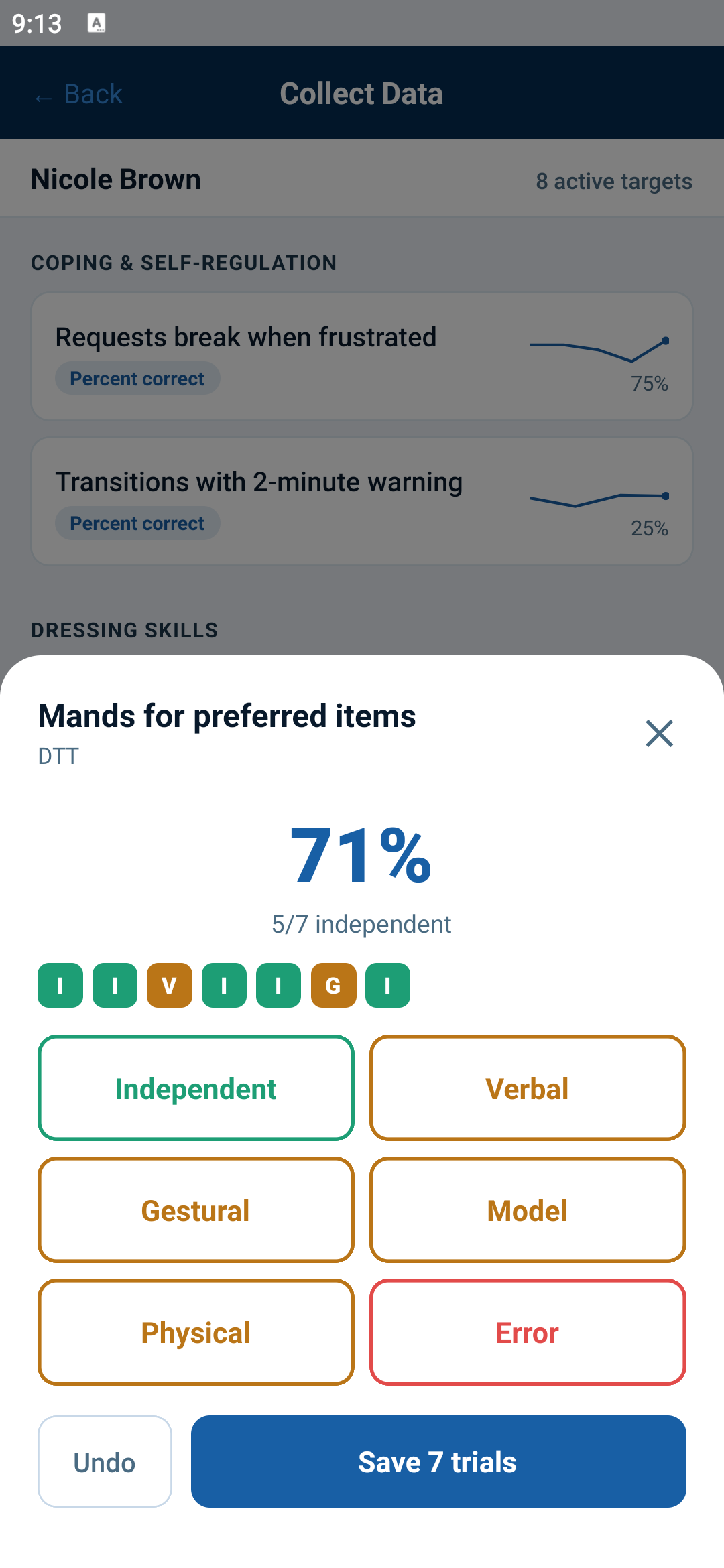
Discrete trial collection on the phone: seven trials recorded for one target, five independent, shown as 71 percent with a strip of the prompt used on each trial.

Actual product screenshot One tap per trial, and it keeps working with no signal.

Built for the hand that's holding the phone

RBTs collect mid-session, often with no signal and one hand occupied. Every collector is built for that: the DTT trial strip, the frequency tally, the duration stopwatch, the interval timer with its vibrate cue, the task-analysis checklist, the ABC quick-form.

  • Full offline capture with idempotent sync, so a trial never lands twice
  • Original collection timestamps preserved
  • A running percentage while trials are taken, and each target's trend line updates the moment they are saved
What the BCBA stops doing: reconstructing a session note days later from memory, and rebuilding the same graphs by hand for every review. Capture happens during the session, the AI drafts from that data, and the graphs render themselves, so what is left is reading it and signing it.

From blank page to running program in minutes

Programs and targets take generic mastery criteria that work across every data type: a threshold, a number of consecutive sessions, a number of staff. Start from the built-in program library (manding, tacting, listener responding, behavior reduction, task analyses) and adapt from there.

  • Prompt hierarchies configurable per target
  • Mastery auto-check runs nightly and notifies the BCBA
  • Status transitions with full audit trail

AI that respects the signature

Structured data underneath is what makes an AI draft worth reading. Session-note narratives come from the trials, frequencies, and durations actually recorded in the session. A clinician still reviews, edits, and signs, and provenance is stored for audit.

  • Draft notes from real session data
  • Progress summaries across targets for plan reviews
  • Every AI call logged; output flagged as AI-generated

Standardized assessments, built in

Run intake and re-authorization assessments in the platform instead of a second tool: domain and item scoring grids, repeated administrations tracked over time, per-domain progress shown side by side, and one-click program targets from the lowest-scoring items. You get the engine plus editable starter grids. Published instruments like VB-MAPP, ABLLS-R, and Vineland are copyrighted, so you enter your own licensed items rather than getting them bundled with the software.

  • Score at intake and every re-auth, compared over time
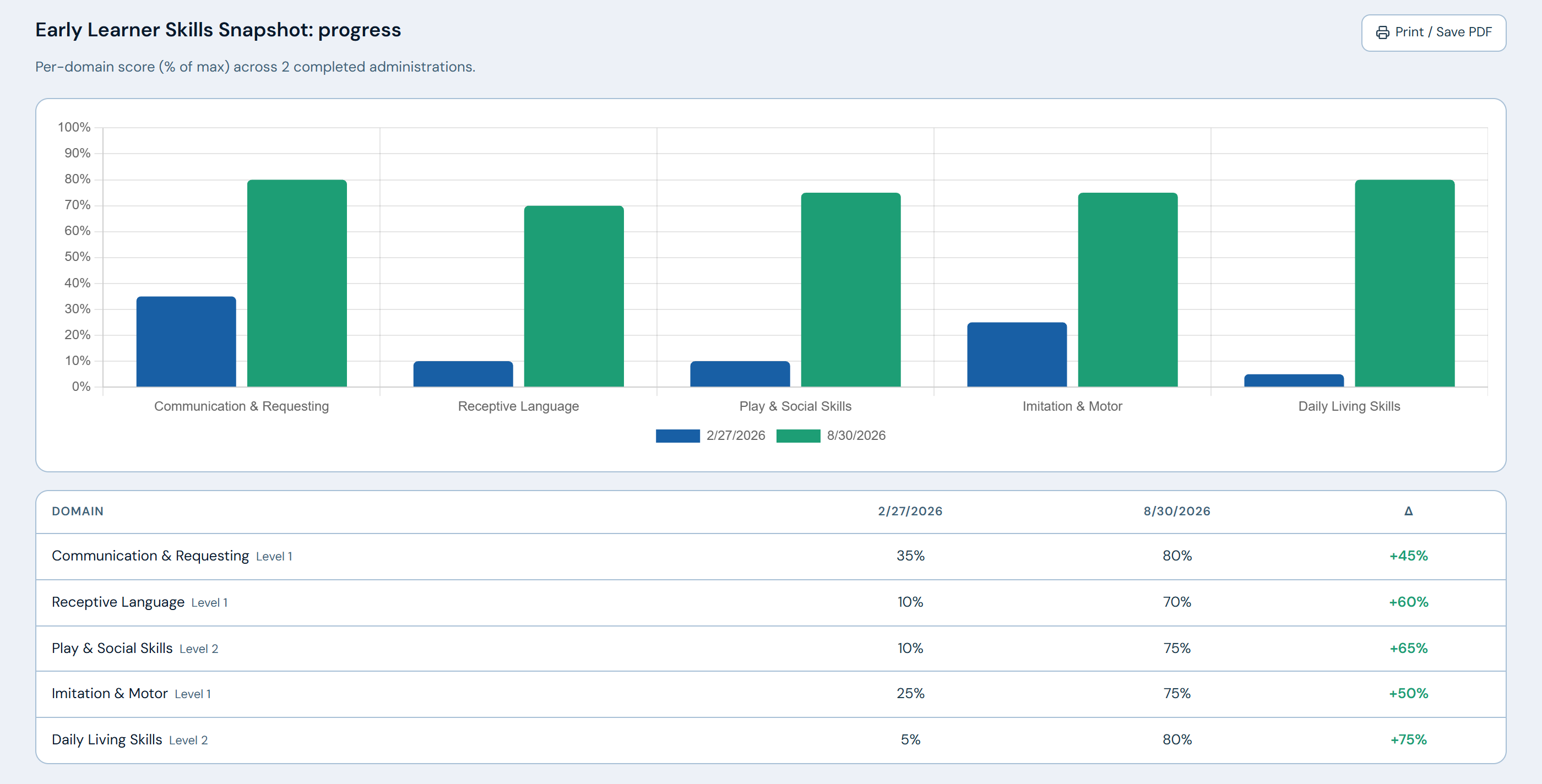
  • Per-domain progress deltas shown side by side
  • One-click program targets from the weakest items
ABAVault · Assessment progress
One client's skills assessment compared across two administrations six months apart, with the score for each domain shown as a chart and a table.

Actual product screenshot The same assessment at intake and at re-auth, domain by domain.

Run a mock session in the demo.

Bring a program you're running now. We'll build it live and collect data against it.

Apply for beta access Next: Billing & RCM →